Granola
Sync board and portfolio meeting notes from Granola into Fundra, attached to the right company.
Board meetings hold some of the most valuable context in a portfolio: what actually happened, what changed since last quarter, where the risks are. The Granola integration brings those notes into Fundra and files them against the company they belong to, next to KPIs, financials and investor updates.
Notes are shared with your whole team, so context isn't stuck in one person's note-taking app.
Set up
The integration runs through Zapier and takes a two-step Zap (free-tier eligible integration): Granola triggers when a note is added to a folder, and Fundra creates the note. You'll need a Granola account connected to Zapier and a Fundra API key.
1. Accept the Zapier invite
The Fundra Zapier app isn't publicly listed yet. Accept the invite here to get access to it – otherwise you won't find Fundra when building the Zap.
2. Create a Fundra API key
Go to Settings → API and create a key. Only account admins can do this, so ask one of them if you don't have admin rights. Copy the key – it's shown once.
3. Pick a Granola folder
In Granola, create the folder whose notes should reach Fundra – Portfolio is a sensible name. Everything you drop into it syncs; everything outside it stays private. Board meetings, portfolio catch-ups and diligence calls go in, your internal 1:1s stay out.
4. Set up the trigger
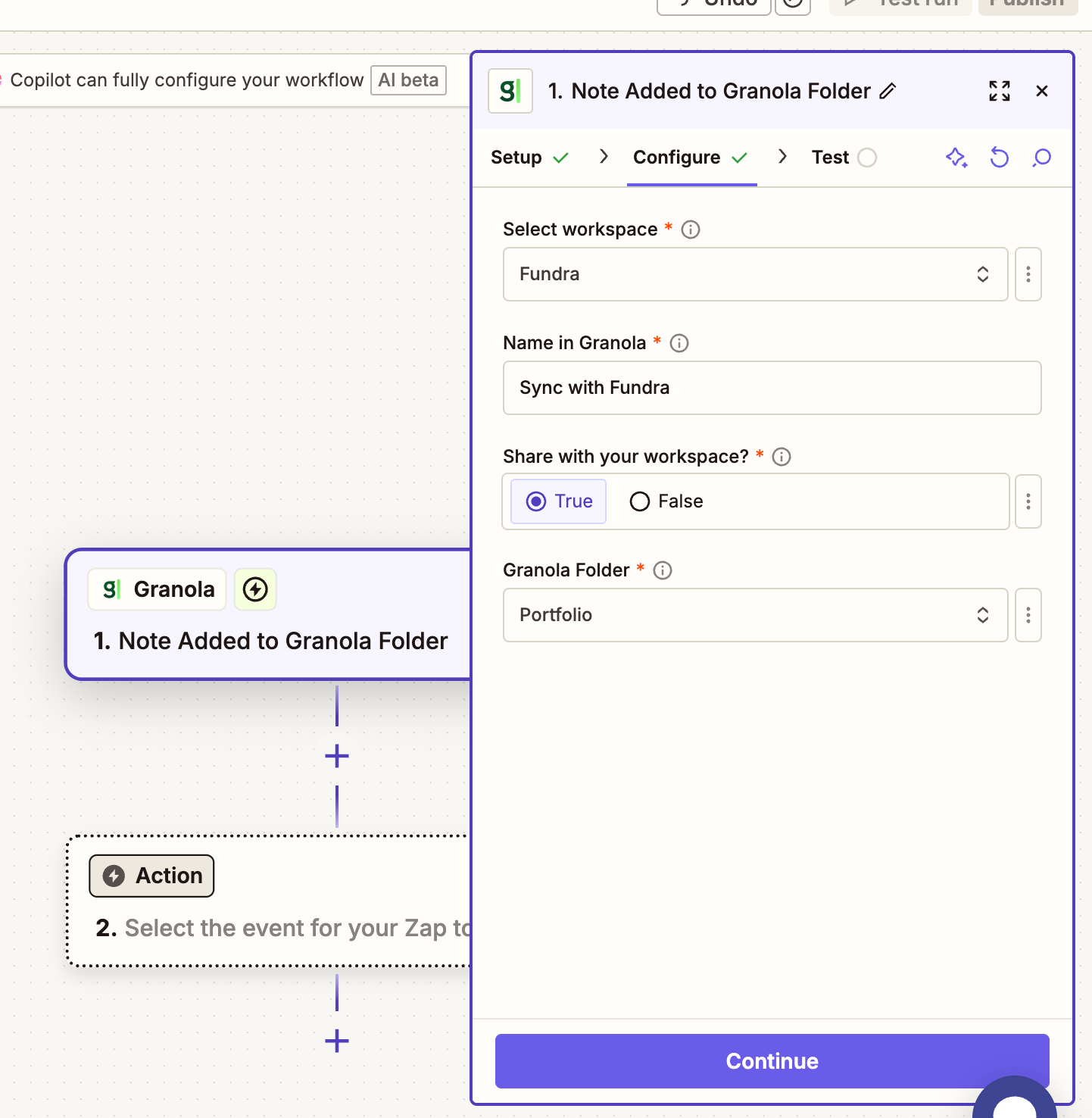
In Zapier, create a new Zap and choose Granola → Note Added to Granola Folder as the trigger. Connect your Granola account, then configure it:
- Select workspace – your Granola workspace.
- Name in Granola – how the connection appears inside Granola, e.g.
Sync with Fundra. - Share with your workspace? –
True, so notes are shared with your team rather than kept private to you. - Granola Folder – the folder from step 3.
5. Set up the action
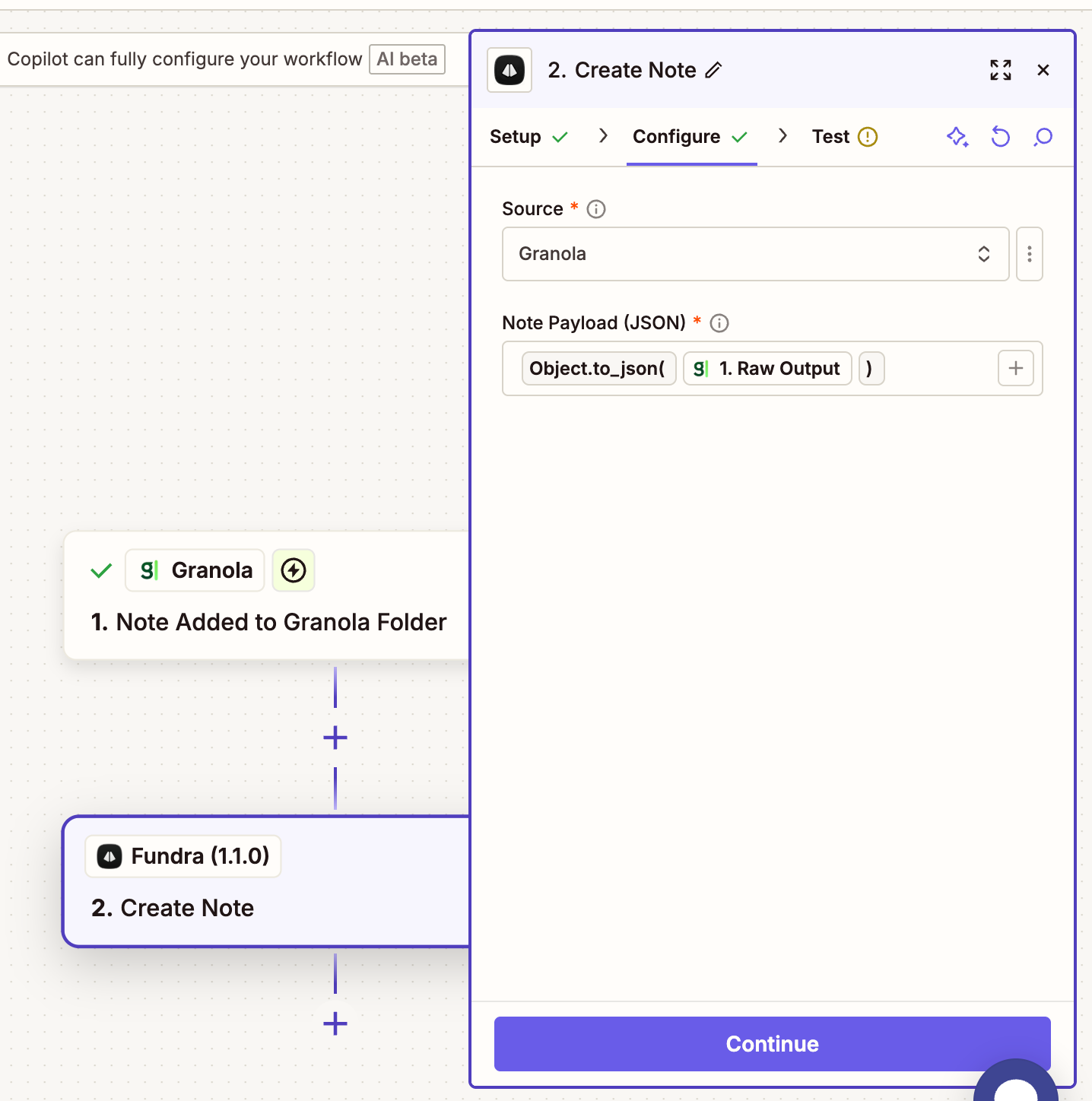
Add a second step, search for Fundra, and choose Create Note. Connect your Fundra account with the API key from step 2, then configure it:
- Source –
Granola. - Note Payload (JSON) – the trigger's raw output, wrapped so it's passed as JSON:
Object.to_json(1. Raw Output). Don't map individual fields; Fundra reads the whole Granola payload.
Test the step, then publish the Zap.
6. Check it landed
Open the company you last met with and look at its Investor updates tab. The note appears there with the meeting title, date and attendees.
Day-to-day use
Add a note to the Granola folder and it syncs to Fundra, matched to the right portfolio company. Adding an existing note to the folder works too, so you can backfill past meetings.
Granola's Send to Zapier action can push individual notes on demand if you'd rather not use a folder – set up a second Zap with that trigger. In practice, adding and removing notes from the folder is fewer clicks.
What gets synced
| From Granola | In Fundra |
|---|---|
| Note title | Note subject |
| Enhanced notes | Note body – falls back to your raw notes |
| Transcript | Kept with the note |
| Attendees | Participants, used to match the company |
| Calendar event | Meeting title and date |
| Granola link | Link back to the original note |
How notes are matched to companies
Fundra matches on the meeting's attendees, ignoring anyone from your own fund's domain:
- Attendee email domains, matched against your portfolio companies' domains and known aliases.
- Attendee email addresses, matched against contacts on your companies.
- The meeting title, fuzzy-matched against company names.
An unmatched note is still stored and can be assigned to a company by hand. Board meetings where the only external attendees are, say, co-investors are the usual reason a note doesn't match – adding those people as contacts on the company fixes it for next time.
What you can do with the notes
Board context feeds the rest of Fundra: use it to generate richer LP updates, summarise how a company has developed over the year, surface risks raised across meetings, and track action items over time. The MCP server reads these notes too, so you can ask an AI assistant questions like "what were the main concerns raised in Acme's last three board meetings?".
Other note-taking tools
Using something other than Granola? Tell us which one – we're expanding the integrations. In the meantime, the Zapier action's Manual source accepts a subject, body and a company domain or email address from any trigger, which covers most tools.